Montabi Steam Demo — Free Practice Slice
Install the demo, learn the 3×3 grid, and decide if the full roguelike loop fits you.
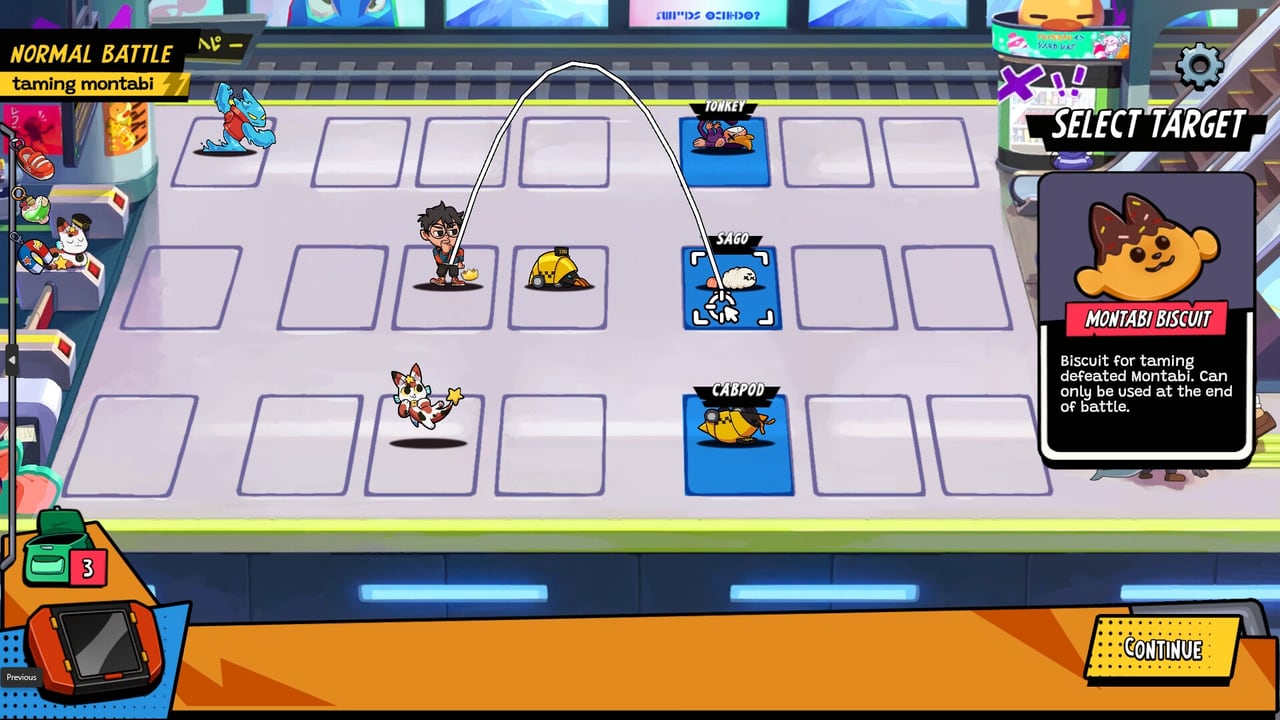
Montabi ships a standalone Steam demo (app 3750130) separate from the paid game listing. The demo is a single-player vertical slice of the creature-collector roguelike deckbuilder from Mankibo, published by Akupara Games, and it remains available after the August 6, 2026 launch for players who want to test Trainer + two Montabi combat before spending $19.99. This page explains how to install the demo, what to practice, how it differs from version 1.0, and how it connects to Steam Next Fest June 2026 history.
For purchase options after the demo, see Platforms. For full-game onboarding, read Getting Started.
How to install the demo
- Open the Montabi Steam store page and scroll to the Demo section—or search Steam for the demo app 3750130.
- Click Download Demo and install to the same library you use for other PC titles. Windows and macOS builds follow the same accessibility tags as the full game where applicable.
- Launch the demo client, not the paid app, when learning controls. Bind inputs using Controls & Input before your first elite.
- Verify performance against System Requirements—the install is tiny, but integrated GPUs still benefit from the demo stress test.
Demo progress does not carry into the paid game unless official patch notes announce otherwise. Plan a fresh save when you upgrade.
What the demo teaches
The slice compresses the full city loop into a few hours. Focus practice on systems that transfer directly to 1.0:
Grid and AP fundamentals
Fights play on a 3×3 grid with four-card hands and 3 AP per turn with carryover on each unit. The demo punishes players who dump every point immediately—bank AP on your Trainer when you expect a telegraphed strike. Pair demo drills with Combat & Positioning once you understand basic targeting.
Taming with biscuits
Victories grant biscuits you can spend to tame wild Montabi. The demo shows how taming interacts with team slots (two active fighters beside the Trainer) without exposing the entire 60+ roster. Use How to Tame Montabi when you transition to the full game and biscuit prices shift after launch tuning.
Stickards and deck surgery
Next Fest highlighted a Stickards room so players learn deck thinning before bosses. Practice removing dead draws after evolutions—even in the demo, bloated decks lose elite fights. Full-game Items expand Stickards into a deeper meta layer.
Trainer death stakes
Trainer HP at zero ends the run in the demo exactly like 1.0. Treat the demo as a safe place to lose runs while learning lose conditions, not as a casual sandbox with infinite continues.
Next Fest June 2026 context
Before launch, the demo doubled as the Steam Next Fest (June 2026) build. Headline content included:
- Subway Station —early-city zone with tutorial pacing.
- Stickards tutorial room —deck modification before elites.
- Kaibug —showcase Montabi species for taming cadence.
Read the full festival recap on Next Fest June 2026. July 2026 devlog balance passes may make Kaibug and other lines feel different in 1.0 than you remember from the festival—check July 2026 Devlog summaries.
Demo limitations versus version 1.0
| Topic | Demo slice | Full game 1.0 |
|---|---|---|
| Trainers | Mostly Student focus | Fighter and Chef via rank unlocks |
| Map depth | Subway Station + tutorial nodes | Three city areas, 30+ events, X Gang bosses |
| Cards & items | Subset of kits | 570+ cards, 200+ items at launch |
| Montabi roster | Festival subset incl. Kaibug | 22 starters, 60+ Montabi, full Montapedia |
| Achievements | Separate demo app | 22 Steam achievements on paid listing |
| Ascension | Not the focus | Post-clear Ascension ladder incl. Ascension 10 goals |
| Price | Free | $19.99 MSRP; launch-week discounts may apply |
The demo is an on-ramp, not a substitute for the Launch Day experience.
Recommended demo checklist
- Finish at least one full demo route without Trainer death.
- Visit Stickards and remove at least two weak cards from one Montabi deck.
- Tame one wild species you did not draft at run start.
- Remap controls per Controls on your platform.
- Watch the embedded demo trailer above, then compare tone to the Launch Day trailer on the paid page.
- If you enjoy the loop, read Platforms for Epic, GOG, Xbox Play Anywhere, and Nintendo Switch (including Switch 2 storefront notes).
When to skip the demo
Experienced deckbuilder roguelike players who already own 1.0 do not need the demo unless testing a new PC or Steam Deck profile. New players on the fence about single-player grid combat should install the demo first—it costs nothing and surfaces difficulty spikes before purchase.
After the demo
Upgrade through your preferred store on Platforms, then follow Getting Started for the full city map, City Map & Events for Cafe and shop routing, and Updates for post-launch patches. The demo taught you how to fight; 1.0 teaches you how far you can climb—including Ascension covered in Ascension.
Frequently Asked Questions
Quick answers to the most common Montabi questions.
What is the Montabi Steam demo app ID?
Steam lists the demo as app 3750130, separate from the full game app 3141630.
Does demo save data transfer to the full game?
No official cross-save was advertised. Assume a fresh account when you buy version 1.0.
Which areas are in the demo?
Subway Station, a Stickards tutorial room, and Kaibug showcase content from the Next Fest build.
Can I earn Steam achievements in the demo?
Achievements attach to the paid listing. The demo app is separate and does not grant the full 22-trophy set.
Is the demo still available after launch?
Yes as of launch week—the Steam demo app remains installable for practice before purchase.